Hello my name is Pui, I am a web developer based in London.
jQuery - Turning dropdown select into HTML list markup to style
6 June 2014
So I have a dropdown select box of various languages and in the front-end I want to style this in some extravagant way. But of course, styling dropdown select boxes is going to be a little difficult.
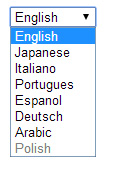
Dropdown which we want to style
What this script does is to turn your select markup into <ul> markup so you can style it. As this is all done through jQuery, for those that have JS turned off in the browser they will see a dropdown which means it is non-JS friendly.
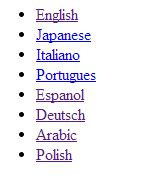
Turn it into a list
We are also using a data attribute on the select to pass a url into the <li>‘s <a> tag. It will also detect whether the select is disabled and add a disabled class to the <li> if you need this. This is how we ended up styling it:
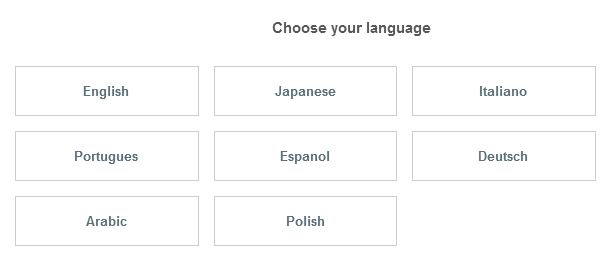
What the dropdown turned into
Go to the below link for the full demo!
HTML
<div class="language_selector_box"> <select name="selector" class="language_select"> <option value="english" selected="selected" data-url="/">English</option> <option value="japanese" data-url="/japanese">Japanese</option> <option value="italian" data-url="/italian">Italiano</option> <option value="portuguese" data-url="/portuguese">Portugues</option> <option value="spanish" data-url="/">Espanol</option> <option value="german" data-url="/">Deutsch</option> <option value="arabic" data-url="/">Arabic</option> <option value="polish" disabled="disabled" data-url="/">Polish</option> </select> </div>
JS
$(document).ready(function(){ language_selector = $('.language_selector_box select');
$list = $('<ul class="language_selector" />'); language_selector.find('option').each(function () { var langOptionValue = $(this).val(); //if option is disabled add class disabled //appending the html markup for the ul $list.append('<li class=" ' + (($(this).attr('disabled') || $(this).attr('selected')) ? ' disabled_flag' : '') + '"> <a class="light_link_transition" href="' + $(this).attr('data-url') + '"' + (($(this).attr('data-url') == "#none" || $(this).attr('selected')) ? ' disabled="disabled" class="disabled"' : '') + '>' + $(this).text() + '</a></li>'); }); language_selector.before($list).hide(); $('ul li.language a').after($list); $('.language_select').hide(); });